Friday, January 24, 2020

Trello Vs Slack — Which is the best tool to Manage My Team?

Trello Vs Slack — Which is the best tool to Manage My Team?

Slack and Trello are two of the most popular software management tools used for managing projects, but there are a few major differences between them. Depending on the nature of your project, either one (or both) of these platforms could help make things flow more smoothly.

Slack vs Trello: which is better? To help you decide on which tool to use for your projects, I’ve laid out all the key information you need to know.

What is Trello?

The makers of the Trello app software describe the platform as a “collaboration tool”. It lets you know what is currently being worked on and who is working on it. The interface is fairly simple and consists of a large board with various cards and lists that let you see the progress of your project. Its primary use case is as a project management software and this is where it focuses its features.

What is Slack?

The Slack app is an instant-messaging tool for your company that serves as a hub for all your work-related communication. It consists of workspaces and channels that let you share files and talk to all members of your team, and vice versa. As well as group discussions, Slack can also be used for private discussions with one or more specific users.

Both tools are useful software for managing projects. Trello allows you to view the progress of your projects in one glance, whereas Slack focuses more on the communication between you and your colleagues.

If you’re looking for a quick way to track your project’s progress on their work, then Trello is your best option. However, if you want to be able to share important updates and files with your colleagues and create a place for discussion, then use Slack as a better alternative.

Trello Primary Uses, Organization, and Features

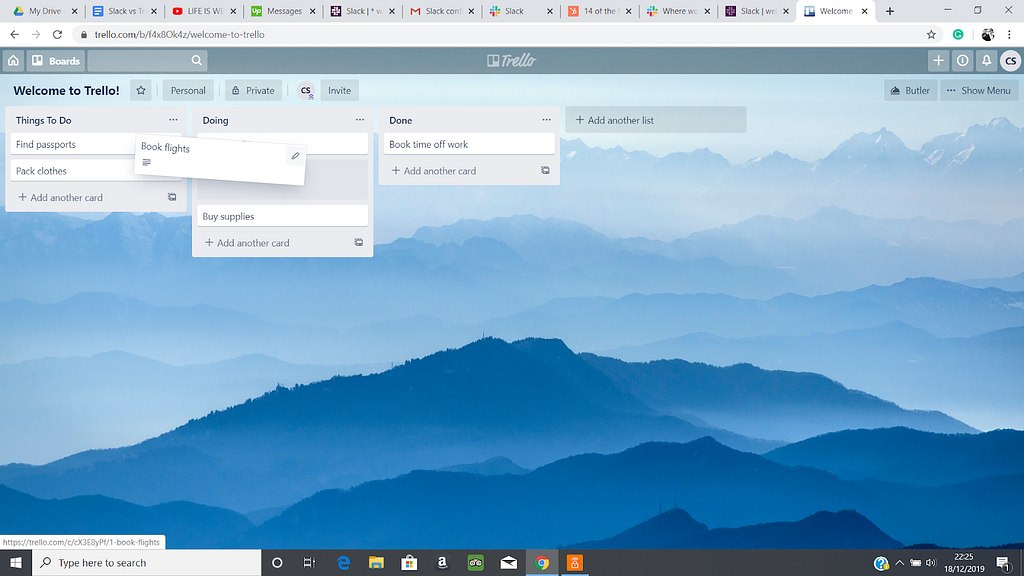
Trello is primarily used for project management and task management software, such as booking a group holiday or creating a new website. The default lists are ‘Things to Do’, ‘Doing, and ‘Done’, but you can rename the titles of these lists or add more if you want.
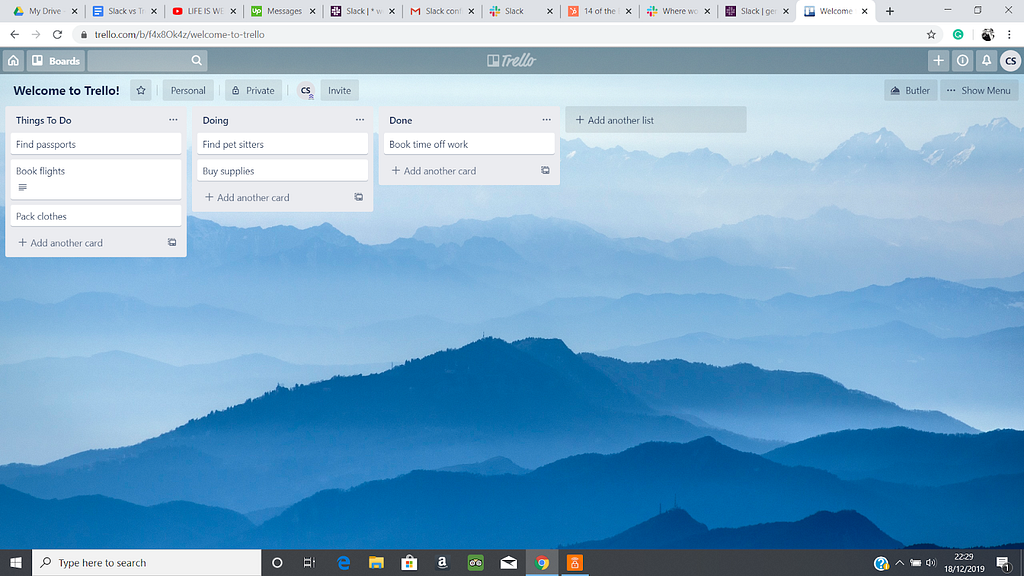
Each list allows you to add tasks in the form of cards, as well as appoint certain members to undergo that task. For example, if you’re booking a holiday and need to book flights, then you can assign that task to a specific person. Once that person is in the process of completing that task, they can move the card to another list to show they are working on it or have finished working on it.

You can also add a due date to the card so your team knows when a task needs to be completed by. This is extremely helpful for time tracking and deadlines.

The board can be viewed publicly, by certain members of your organization, or by all members. You can change your board’s visibility settings at any time. If you want to add new members to your board, then you will need to make your board public before inviting them.

Slack Primary Uses, Organization, and Features

Slack is primarily used as a software tool for communicating and sharing important files with your organization. The main use of the product is essentially a chat room and is designed to be used instead of email. This is useful as you can have access to all your project’s files and messages rather than having them spread across multiple platforms.
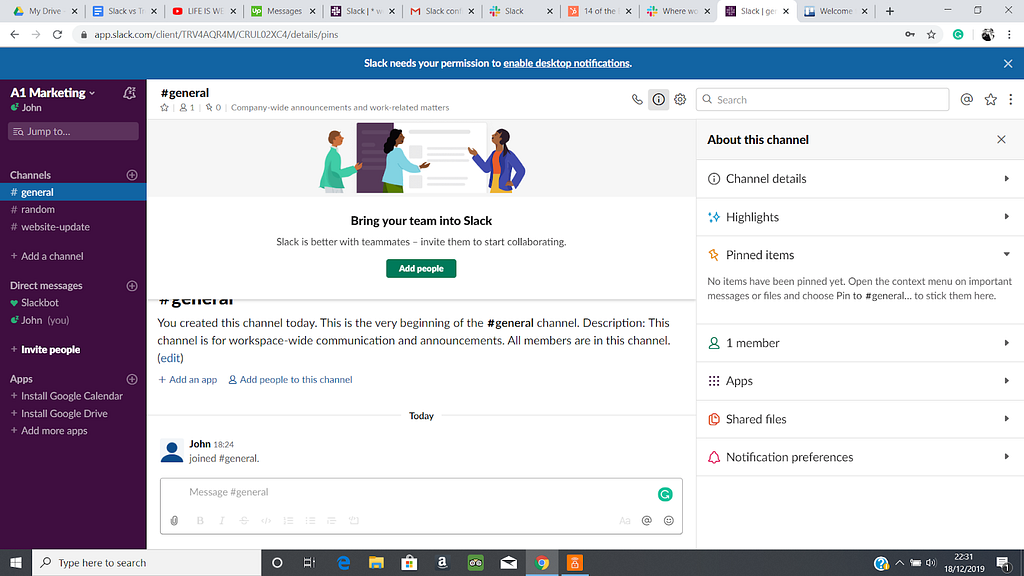
You can organize your communication into individual channels for specific members. Alternatively, you can have channels that are accessible to all members of your organization. If you need to have a private discussion with one or more of your colleagues, then you can do so using the Direct Message function.

Slack isn’t just limited to text-based discussions. It also offers video calls for you to speak to your colleagues face-to-face. You have the ability to share your screen during a video conference call for when you need to explain important information more clearly and directly. However, this function is only available for users of Slack’s Standard paid plan and above.

Although you can use slack as a great collaboration tool for communication it is not a project management app. It doesn’t have any features to track time or follow tasks for the project.

How They Handle Communication

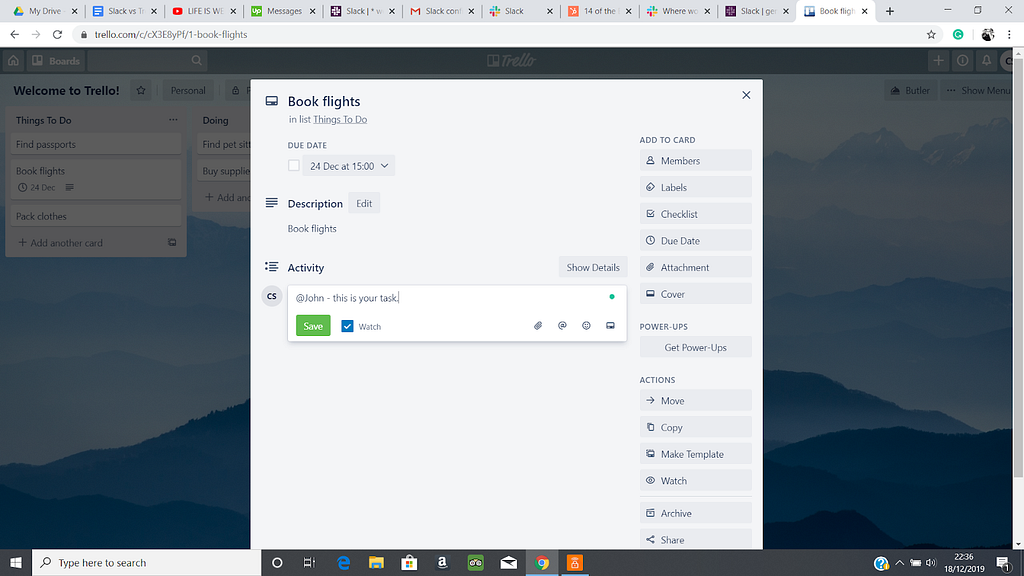
Trello can be used for communication, but it isn’t as developed as other messaging software. Its primary focus is project management, so all communication happens around a specific topic, task or card. You can’t message another user privately, so you would need to use email or another platform for this.

Members of your organization can add messages to cards, which can then be viewed by all team members who have access to that board. As Trello isn’t best used for communicating with your team, I’d recommend using a different software like Slack.
Slack allows you to communicate with your entire team or individual members. Channels serve as chat-rooms for you to engage and speak to your team, and vice versa. You can also create channels for specific team members that only they have access to.

If you’d prefer to talk to your team in person, then there’s a video call option too. If you want a platform to engage with and talk to your entire team, then use Slack as a better option.

Overall Slack can be a huge time saver for communication, especially in remote teams.

Trello Cost

Trello has a free plan, as well as three paid ones. Since its a project management app pricing is usually set on the number of users registered in the team. The Gold plan costs $5 each month, the Business Class plan is $12.50 for each user per month, and the Enterprise plan begins at $20.83 per user every month. Discounts are applied if you pay annually.

Most tools in this space operate under the ‘Software as a Service’ model and will price on a ‘per user per month’ basis.

There are a few differences with each of these plans. As you’d expect, the higher-priced tiers give you access to more advanced features. The Standard version only lets you have ten team boards, one Power-up per board, and upload a maximum of 10MB per file.

The Gold plan provides you with three Power-Ups on your boards, larger file uploads (250 MB max file size), a custom emoji, extra stickers, and board backgrounds.

The Business Class and Enterprise versions boast a huge range of features. which are useful for managing especially big teams and projects.

Trello Business Class

  • Grants Gold Plan to all users in your team
  • Unlimited Team Boards
  • Unlimited Power-Ups
  • Collections (allows you to make groups of boards)
  • Priority email support (all emails to support team are answered within one business day)
  • Admin controls (Admins can control who can make boards, as well as see public and private boards in their team)
  • Bulk-add members through Google Apps (lets you add members to your board all at once)
  • Domain-restricted invites (allows you to restrict invites to just addresses at your business domain)
  • Deactivate members (team members can have their account deactivated without erasing their work)
  • Create outside observers (allows you to have board observers who can view board content but can’t edit it)
  • Bulk data export (allows you to export all of your team’s data in JSON or CSV for extra peace of mind)

Trello Enterprise

  • All features included with Business Class
  • Per-user licensing (lets you pay per user)
  • Pay via invoice
  • Single Sign On (for added security, the Enterprise plan supports SAML 2.0 SSO)

Slack Cost

Slack comes with four price options. There’s a free plan, as well as Standard, Plus, and Enterprise Grid.

Slack also operates as a ‘Software as a Service’ so you’ll see the familiar ‘per user per month’ pricing style here too.

The Standard plan costs $8 per month, whereas the Plus plan costs $15. If you choose to pay annually, then the monthly fee is reduced. Enterprise Grid’s pricing isn’t currently public, so you’d need to contact Slack directly if you’re interested in using this plan.

The free plan of Slack only allows you to view “10,000 of your team’s most recent messages” and also limits you to “10 third-party or custom integrations”. However, in the standard plan, you can do unlimited message searches and use as many integrations as you like.

The Plus plan gives you the same features as in Standard and also gives you features like compliance reporting, guaranteed uptime, and single sign-on.

Enterprise Grid grants you even more advanced features, like being able to send a message to anyone on the team who uses Slack, search through all workspaces, and use multi-workspace channels.

In terms of cost, Trello’s premium plans are less expensive. Their Gold and Business Class tiers are $5 and $12.50 per month compared to $8 and $15 each month for Slack’s Standard and Plus plans.

The cost of Trello’s Enterprise plan is $20.83 per user, whereas the price of Slack’s Enterprise Grid tier isn’t known unless you get in touch with them. As Slack’s other plans are costlier than Trello’s, it’s fair to presume that their most premium tier is also more expensive.

Trello Ease of Use and Interface

Trello is easy to use and doesn’t take much time to set up. The product designers have really put a lot of thought into the usability of the tool. You only need your email, name, and password to create an account. Once you’ve entered this information, you’re presented with your dashboard to create a new board or work on an existing one.

The interface is straightforward to navigate task management software. It doesn’t take too long to get to grips with. Lists and cards can be added, moved, and edited with ease.
In the upper right-hand corner of your dashboard where your initials are, you can access your settings, profile, cards, activity, keyboard shortcuts, and more. Additionally, you can change the initials icon to a photo, as well as tweak your notification settings. There’s also a ‘Color Blind Friendly Mode’ for color blind users.

As an easy to use task management and project collaboration tool, it really excels.

Slack Ease of Use and Interface

Slack is fairly simple to set-up and easy to use. Again it’s another product that has a lot of love and care put into the user experience design. To join a workspace, all you need to do is enter the name of the workspace you were invited to and you are set up in no time. After that, you have access to all of your team’s channels.

Creating a workspace is also easy. You signup using your email and then enter the verification code sent to you. Next, you enter in the name of your company and the project your team is working on. You can then add some of your team members to the channel using their email addresses. That’s all there is to it.
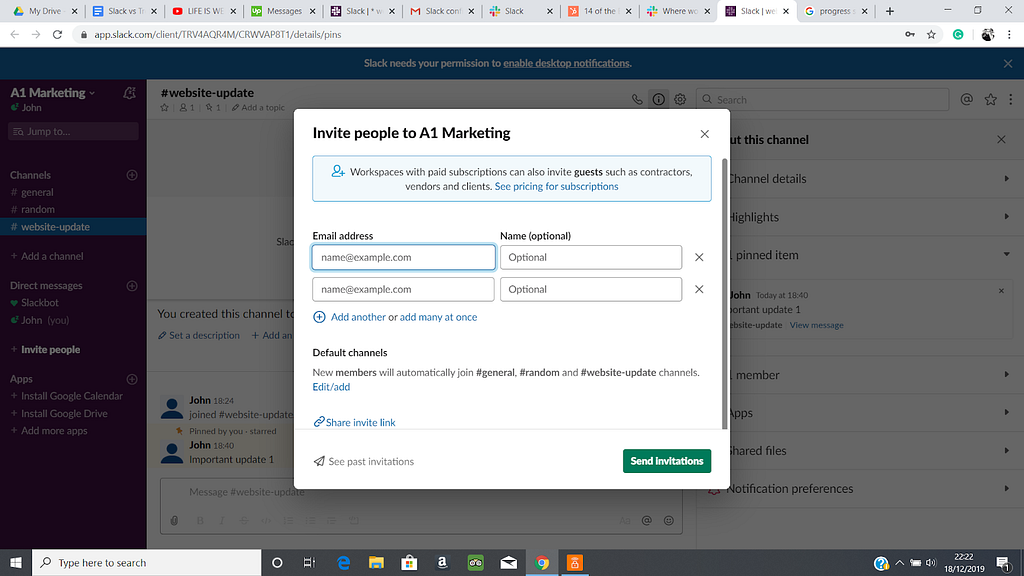
Once you have access to your workspace, you can create various channels for your team or use the premade ones. You can also send private messages to members of your team by clicking on the ‘+’ icon next to Direct Message.

Pressing on your name at the top of the left-hand side of the page opens up a plethora of options, like your Profile & account and Preferences. You can change your name, bio, photo, and contact information in Profile & account. Additionally, you can set a status to let members of your team know your current availability.

Using the channels is simple. You can pin messages which places them at the top of the channel to make them more visible to your team members. This is useful when you have an important update for your team. You can also look at the highlights of the channel, such as the most popular posts or latest file uploads.
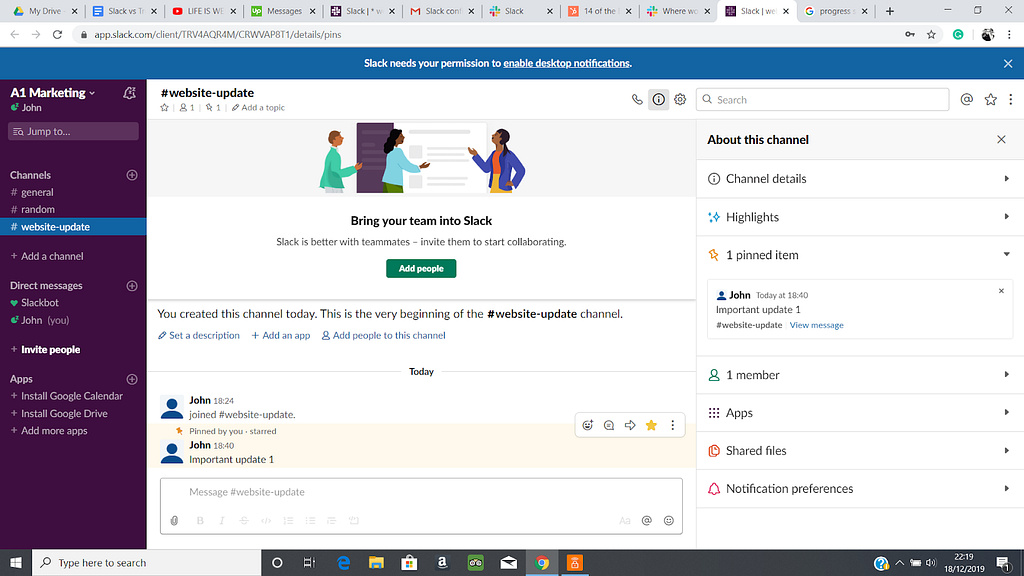
Slack’s interface is a little more complicated than Trello as the product has more options and features, but it shouldn’t take too long before you get the hang of how things work.

Despite being a little less straightforward to use than Trello, Slack is definitely the better platform for communicating with your team.

Trello Reliability

Trello is an extremely secure software product. Its primarily a task management software so downtime will likely have big consequences to productivity. They are SOC2 Type 2, PCI-DSS, Privacy Shield, and ISO/IEC 27001 certified. They run automated vulnerability scans every 7 days and penetrations tests annually. In addition to this, the system undergoes a full encrypted backup every 24 hours.

The platform “uses Transport Layer Security to create a secure connection using 128-bit Advanced Encryption encryption. This includes all data sent between the web, desktop, iOS, and Android apps and the Trello servers”. The list for the company’s security operations is huge, and there are many practices they undergo to ensure the safety of their software.

For users of Enterprise and Access, SAML 2.0 SSO is used for added security. With an uptime of 99.93%, the platform is very reliable and doesn’t suffer from much downtime, except for scheduled maintenance. This means you don’t need to worry about the platform being unavailable for extended periods of time.

Slack Reliability

Slack is also a very secure product. They are SOC 2 Type 2, SOC 3, ISO/IEC 27001 (and 27017), and Privacy Shield certified, among others. Slack uses reputable security firms to run frequent audits of their tools to check for any vulnerabilities. They run constant automated scans of their web platform too and all employees of Slack are background checked.

Slack uses the latest most reliable cipher suites and protocols to encrypt all traffic in transit. Their Customer Data is encrypted at rest. Users of Slack’s premium plans have access to more advanced security measures, but even the free tier of the platform is very secure.

For the last quarter, Slack has an uptime of 99.99% and rarely have any issues with their servers.

Both software are both equally secure, so you don’t need to be concerned about the safety of your data and files on each platform. Slack’s reliability is slightly better with an uptime of 99.99% as opposed to Trello’s 99.93%. However, the difference is so marginal that I don’t think it’s a point to use one platform over the other.

Integrations with Other Tools

You can integrate Trello with various other software tools to maximize its efficiency and productivity. Some of these software tools are Zapier, IfThisThenThat, Asana, and Slack.

Slack can also be integrated with various software tools, including Zapier, IfThisThenThat, Giphy, and Marker. Both Trello and Slack have free APIs for you to integrate your own custom apps with the tool.

Currently, Trello only allows integrations with apps for members of their paid tiers. Slack, on the other hand, offers 10 integrations with apps for users of their free plan. Premium tiers have access to over 100 app integrations.

Using Slack and Trello together is extremely beneficial as they both bring advantageous software tools to your team and project. Trello can be used to help you track and check the progress of your project, while Slack can be used to communicate with and update your team. Instead of using one tool over the other for managing your team, I’d recommend using the both of them.

Platforms Available

Trello is currently via the company’s website, as well as an app for Windows, macOS users, Android, and iPhone users.

Slack is also available on all of these platforms. This means they’re both very accessible for teams. The Android and iPhone apps for Slack and Trello are very handy as don’t need to be in front of a computer to track your project’s progress or update your team about important matters.

Customer Support

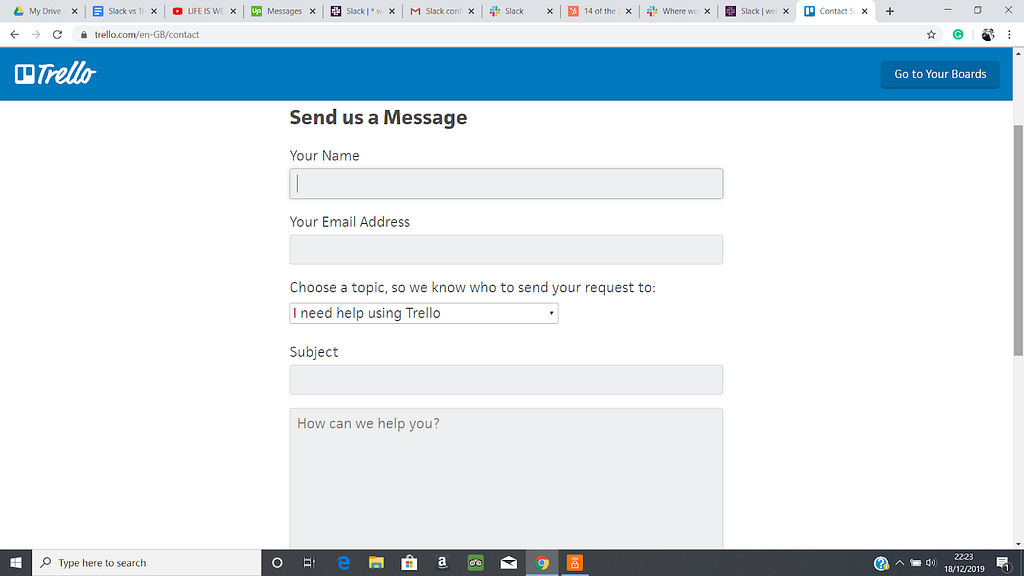
Trello’s customer support work fairly quickly to help your concerns and queries, but priority is given to users with premium plans. To speak to an advisor, you need to fill in a form on the ‘Contact Support’ page.

The form asks for your name, email, the topic, and the subject of your question. You can then write a brief description of your query, as well as include any relevant files. There’s also an option to grant the customer advisor temporary access to your account.
If you want a quicker response to your problem, you can use the Community Support forum. There you can post your query for other members of the community to assist you with.

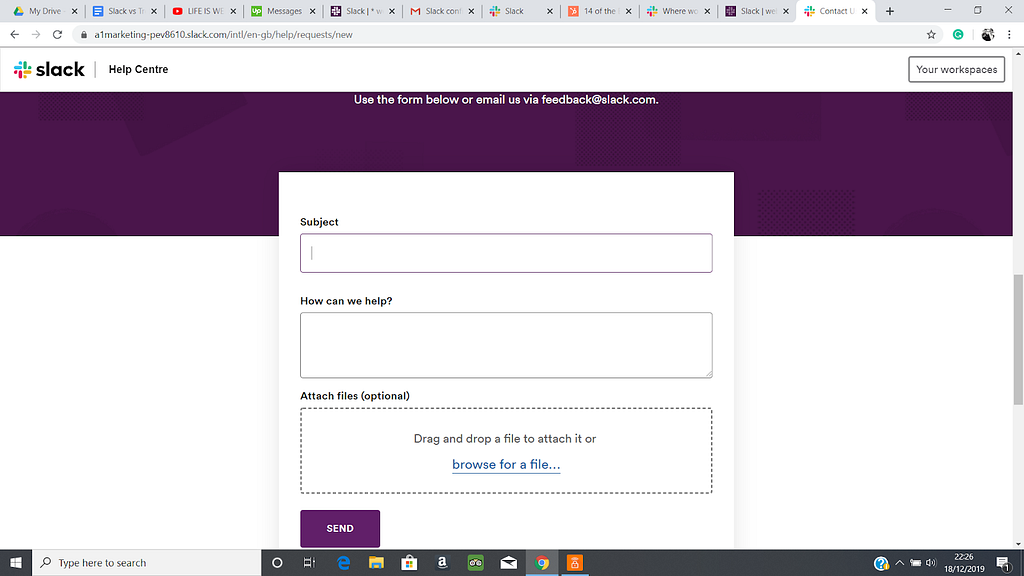
In contrast, Slack’s customer support is limited to just advisors of the company. They don’t currently have a community forum. To contact a Slack advisor, you fill in a form on their ‘Contact Us’ page. You enter in the subject of your query, as well as the description and any relevant files.
Users of Slack’s Plus and Enterprise Grid tiers get 24/7 support, as well as a swift response time (within 4 hours).

Trello has better customer support overall as you can use the Community Support forum to get a quicker response to your enquiry. However, with more advanced tiers, you can expect a response from an advisor within 1 business day, which is slightly longer than Slack.

Conclusion

Slack vs Trello is not really the question you should be asking, both are useful collaboration tools for managing your team and your projects. Trello shines with helping you track your progress with a project, while Slack is better used for communicating with your team.

Trello’s interface is easier to navigate, so if you’re not tech-savvy, this might be ideal. Although Slack is a little more complicated to use, it shouldn’t take you long to get to grips with the tool.

In terms of cost, Trello and Slack both have free plans that work well for small companies. For larger teams and projects, I’d recommend using one of the paid tiers they offer. Trello is slightly cheaper overall, but is a little less reliable with its uptime.

Security wise, there isn’t much difference between the two services as they are both use advanced safety practices to protect you and your data. Trello does have better customer support as you can access a community forum to help you get a response to your query quicker. Slack doesn’t currently have this feature.

The two platforms have a free API for custom apps and can be integrated with a plethora of tools for maximum efficiency. They are both available for Windows, macOS, Android, and iPhone.

So, which platform do I recommended for managing your team? Overall, I think Slack is the better choice as you communicate with all of your team and share important documents. While Trello is excellent for tracking your project, you would need to use another tool for communication.

As Trello and Slack can be integrated with one another, I’d advise you to use both of the platforms instead of substituting one over the other. They work excellently in unison and allow you to speak to your entire team in one place and manage the development of your project.

This post first appeared on medium.com/best-software


Trello Vs Slack — Which is the best tool to Manage My Team? was originally published in Best Software on Medium, where people are continuing the conversation by highlighting and responding to this story.

Lynda vs Pluralsight (LinkedIn Learning) vs Tutsplus

Pluralsight, Lynda (now LinkendIn Learning) Envato Tutsplus, Udemy, and Coursera are five popular online learning providers. They offer a wide range of lessons and tutorials taught by professionals in an array of different topics.

Lynda vs Pluralsight vs Tutsplus, which is the best online course provider? To help you refine your options, I’ve taken an in-depth look at each provider, including course topics, teaching styles, and pricing. Udemy and Coursera are a little different than the other three, so I’ve reviewed them sepeartely.

Pluralsight Course Topics

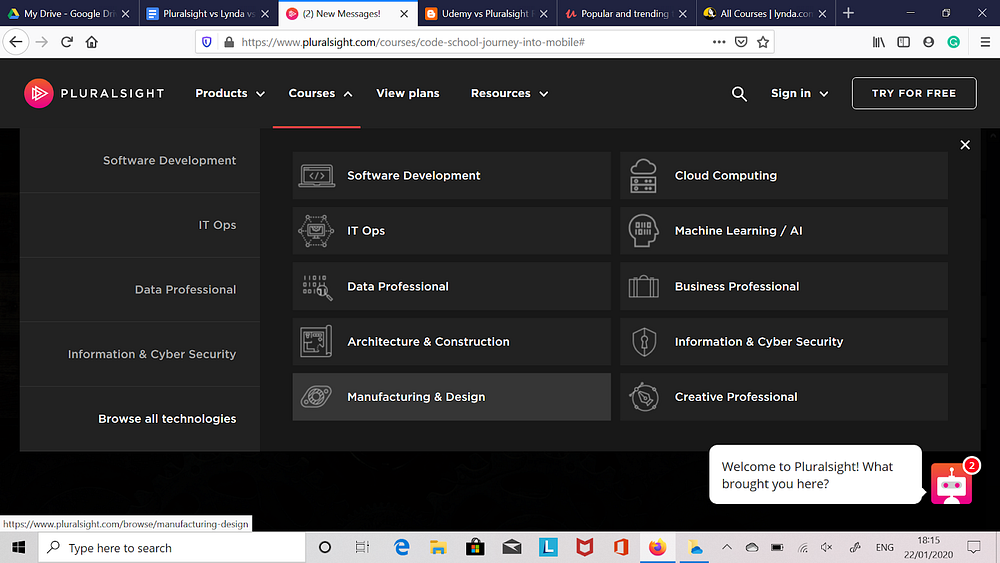
Pluralsight offers thousands of online learning courses in a range of technologies, constructed into various learning paths. You can study a wide range of skills such whether you are new to the skill:

  • Software development, Web development, including JavaScript, Python, Android, HTML, Ruby, .NET, and JQuery.
  • IT ops, including Windows Server, Docker, Oracle, Cisco, Linux, VMware, CompTIA, MCSE and SharePoint.
  • Security, including security auditing, penetration testing and digital forensics.
  • Business professional skills, including leadership, project management and Microsoft Office.
  • Data professional, including SQL, Hadoop, MongoDB and Tableau.
  • Creative professional, including Unity, Maya, Adobe Photoshop and Adobe Premiere.

Lynda (LinkedIn Learning) Course Topics

Lynda offers a huge number of courses and learning paths in subjects like Marketing, Photography, IT, Web Development, Business Skills, and Design. They also offer courses in specific software like Photoshop and Azure, as well as certain companies and authors.

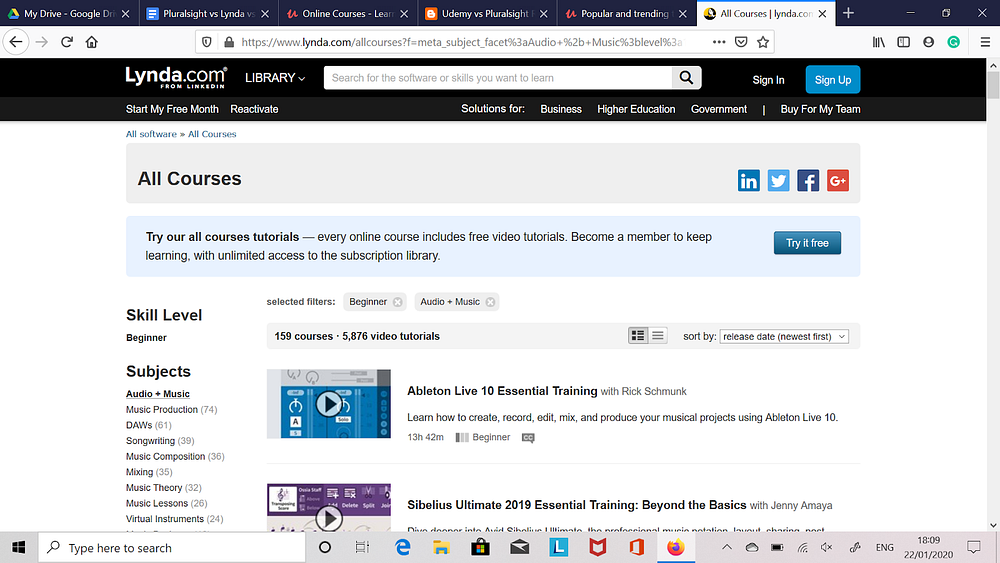
When studying with Lynda, each subject has sub-topics in that particular field. For example, Songwriting, Virtual Instruments, Mixing, and Daws all come under Audio and Music.

Tutsplus Course Topics

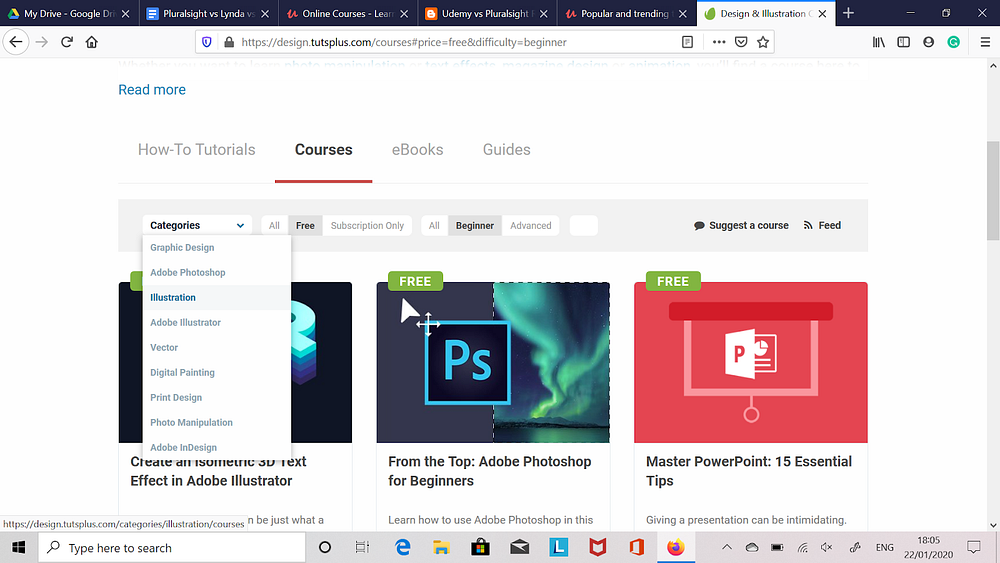
There are a lot of different courses, how-to tutorials, eBooks, and guides that Tutsplus cover. These include Design and Illustration, Music and Audio, Code, and Business skills. New courses are added regularly and old courses are frequently updated.

Clicking on a particular topic will divert you to a page with all the available courses in that particular area. You can tweak the filter options to show sub-categories of a topic, as well as tweak the type of courses, tutorials, guides, and eBooks you are shown.

Udemy Course Topics

Udemy has one of the best ranges of course topics available, such as Health and Fitness, Lifestyle, Photography, Design, Music, Office Productivity, and many more desirable skills. Unlike Pluralsight and Lynda which focus more on subjects involving technology, Udemy’s courses are a lot more varied.

Each of the different topics they have courses on have their own sub-categories. These sub-categories also have their own sub-categories, which means you can find niche subjects about practically anything.

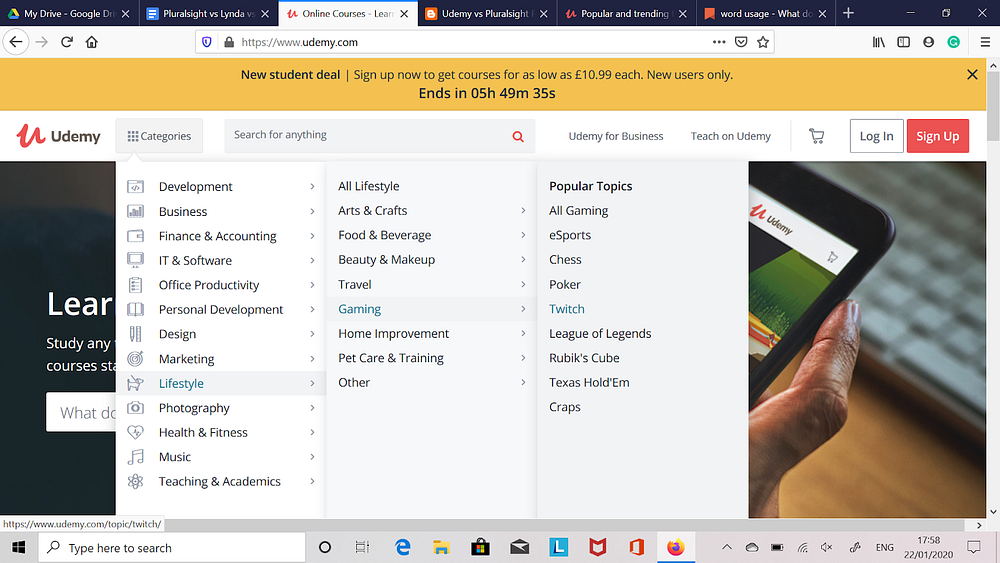
For example, specialized subjects like Arts and Crafts, Beauty and Makeup, Gaming, Travel, and Home Improvement all come under Lifestyle. If you hover your mouse over Gaming, sub-categories like Twitch, Poker, League of Legends, etc., appear.

Coursera Topics

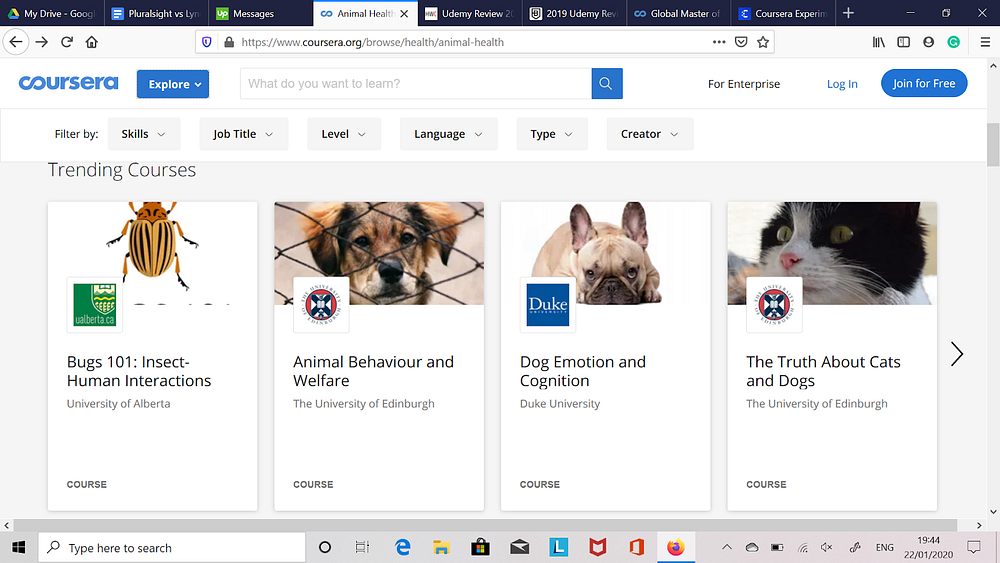
There are a lot of different course categories on Coursera, such as Arts and Humanities, Data Science, Health, Math and Logic, among others. Various sub-topics are included under the main category. For example, Health branches out to Animal Health, Basic Science, Health Informatics, Nutrition, and other skills.

When you click on the particular subject, related courses show up. Here, you can change the filter options, such as the skill level and the creator of the course. If you hover your mouse over a course, you can view further details about it, like its total runtime.

Pluralsight Teaching Style

Pluralsight’s core teaching style is done through watching video tutorials on your chosen subject. This is ideal as you can simply watch a video on the course you want training in at your own convenience, such as when you’re commuting.

The only downside with this is it is not very interactive. If you learn better through interactive methods, then Pluralsight might not be suited to you.

Lynda (LinkedIn Learning) Teaching Style

The teaching style for Lynda involves watching videos on the course you want to learn. The videos can be a few minutes long to over half an hour. The length of the video tutorial is based on the instructor, content and the course topic.

The titles and description of the videos in Lynda make finding the material for your course a breeze. You can simply hover your cursor over the course title to get more details, such as the runtime of the video and other course information.

Tutsplus Teaching Style

Tutsplus consists of various teaching styles in the form of videos and e-books. Courses are normally around two to three hours long videos. They serve as good introductions to a subject, while eBooks provide more advanced material. Using videos and eBooks together work very well for adding more variety to how you learn.

Udemy Teaching Style

Udemy’s courses come in the form of modules and lessons, which are taught via video tutorials, study notes, and tests. The creators behind these courses are not as certified as other platforms, as anyone can join the platform as an instructor.

While the majority of the instructors on Udemy are knowledgeable in their craft, there aren’t as many reputable content creators like there are on other platforms, such as Lynda.

It’s best to look at the ratings on a course so you can decide whether it’s worth taking. Obviously, high-rated courses are more likely to be informative and enlightening than low-rated ones.

Coursera Teaching Style

Coursera is partnered with more than 150 universities and colleges from around the globe. It offers over 2,700 online learning courses, multiple degree programs, and hundreds of specializations.

The courses on Coursera are taught by some of the best instructors from well-established universities and educational institutions. These include University of Michigan, Imperial College London, and University of Pennsylvania.

The type of content in a course includes recorded video lectures, graded assignments, and group discussion forums. Some courses even require you to complete a final exam at the end of the program. Once you complete a course, you can pay for an electronic course certificate to share with others, such as potential employers.

Pluralsight Course Depth

Pluralsight offers over five thousand courses that train you on programming languages like Swift, Python, JavaScript, as well as frameworks such as Django, Linux, and Spring. You can also learn about more ancient tools like Docker and Jenkins.

The courses on Pluralsight are taught by instructors who are proficient in the topic they’re teaching. This means you’re learning directly from someone who’s knowledgeable about their field.

You don’t need to worry about the instructor providing you with inaccurate content. If you want to learn from a specific or well-known instructor in a certain field, you can search using Pluralsight’s instructor profile.

However, there are a few older courses on Pluralsight that are no longer relevant, so keep an eye out for these. There’s not much point learning about an outdated version of a framework or language.

Lynda (LinkedIn Learning) Course Depth

Lynda offers an extensive range of in-depth and high-quality courses. The platform has over 3,000 courses on an array of topics. When you search for courses in your selected field, you can see a brief summary of the video, the total runtime and views, and its recommended skill level.

The majority of the courses on Lynda are great, but you might find some can cover general topics that are a bit too basic and don’t offer much valuable information.

Tutsplus Course Depth

Instructors on Tutsplus are knowledgeable and qualified in their field, so you can trust the content you’re being taught. To make sure all the material they provide is of a high standard, Tutsplus edit everything before it goes live.

Courses, for the most part, provide valuable and in-depth information. However, this depends on the instructor and the content. Most courses consist of several lessons for you to progress onto once you’re ready. You can watch these lessons in any order, so you don’t need to start from the beginning if you’re not a complete newcomer to your course.

Udemy Course Depth

Udemy claim that they have over 100,000 courses available (new and old). As anyone can upload a course to the platform, there is a huge range of categories, including some very niche topics. This enables you to find very specialized content that you might not find on other platforms.

However, it’s important to remember that Udemy is an online course marketplace. Although there are a number of high-quality courses on the platform, there are also a lot that are subpar. As anyone is free to be an instructor on Udemy, this does increase the risk of poor-quality courses.

It’s a good idea to look at the ratings on a particular course for this reason. I prefer the overall standard of Tutsplus courses as they are edited and approved before going live, which shows the platform’s dedication to quality control. The instructors are also much more professional and established.

I think Lynda, Pluralsight, and Coursera also provide good-quality courses that are taught by knowledgeable instructors.

Coursera Course Depth

The courses on Coursera typically run for around 6 weeks. They are a fantastic starting path to a specific topic, especially if you’re a complete newcomer to it. Unfortunately, the majority of the courses are targeted for beginners.

There aren’t a great deal of courses available for students at a more advanced skill level to specialization. If you’re already knowledgeable, then the courses on Coursera might not have much more to teach you. However, if you’re interested in learning about a subject and want to develop your skills, then Coursera is a great platform to use.

Most of the instructors on Coursera are university lecturers and industry professionals, which means you’re learning from some of the top experts in your selected course.

Pluralsight Pricing

Pluralsight currently offers a 10-day free trial or access to 200 minutes of their content. After this trial has ended, you will need to upgrade your plan to continue using their services. Considering the lack of free trial in the other platforms this is a nice touch.

Pluralsight has two pricing plans for individuals, as well as one intended for groups. The latter is aimed for teams and departments. The Personal Plan costs $29 per month or $299 a year. You get access to all courses, skill assessments, mobile and TV apps, email and phone support, and more.

Pluralsight’s Professional Plan is priced at $499 per user each month (billed annually). You are given access to all the features included in the Personal Plan, as well as some bonuses like basic reporting and user analytics.

Pluralsight’s Enterprise package starts at $699 per user each month (billed annually). You get all of the features included in the Personal and Professional plan, as well as some extras like advanced analytics and flexibility. Pluralsight’s website offers more information regarding the features and pricing of this package.

Is PluralSight worth the money? It can be a little on the steep side but they have some great courses that you might not find elsewhwere.

Lynda (LinkedIn Learning) Pricing

Lynda has two subscription plans: Basic Membership and Premium Membership. The basic package is only $25 per month (or $250 per year) and gives you access to weekly new courses and all of their course library.

Lynda’s premium tier is priced at $37.50 per month (or $375 per year) and comes with a Project File feature. This allows you to download the files used in tutorials for more in-depth studying.

For groups with five or more users, discounts are available for either plan.

Tutsplus Pricing

Tutsplus offers one price plan, which starts at $16.50 per month. With this subscription, you are given access to 1,270 video courses, 240+ eBooks, and unlimited downloads on Envato Elements. Tutsplus also has some free courses you can take.

Udemy Pricing

Unlike Pluralsight, Lynda, and the other platforms on the list, Udemy’s courses are a one-time fee. This means you pay for a course once and it’s yours forever. The price of a course depends on the topic and the instructor, but they are all between $10 and $50. There are some free courses you can take, too. When it comes to keeping your courses, between Udemy vs Lynda, Udemy is the best.

Coursera Pricing

The majority of Coursera’s courses are free, but at a slight catch. You can watch videos without handing over any money, but you cannot earn certificates or access graded assignments.

To use these features, Coursera offers a single-tier subscription service, which costs between $39 and $79 per month. The exact price depends on the Specialization of the course.

Pluralsight Customer Service

To help you with any issues or enquiries, you can reach a Pluralsight customer advisor via phone or email. You can email Pluralsight directly or fill out a form on their ‘Contact’ page. It’s not specified how long it takes for an advisor to get back to you with help.

Lynda (LinkedIn Learning) Customer Service

Lynda’s customer service comes in the form of email and phone support. Their phone lines are open Monday to Friday from 6am to 5pm (PT), and 7am to 4pm on Saturdays/Sundays. Emailing Lynda for help involves filling out a form on their ‘Contact Us’ page.

It’s not clear how long it takes for an advisor to respond to your message.

Tutsplus Customer Service

Tutsplus can be contacted via phone and email to help you with any queries. To get in touch with an advisor, you can issue a support ticket. Tutsplus aim to respond to all support tickets within 24 hours, so you don’t need to wait very long for an answer.

Udemy Customer Service

An Udemy customer advisor can be contacted for help via a form on the website’s ‘Support’ page. The platform doesn’t appear to have a phone number you can use, so email is the only type of contact available. It’s not apparent how long it takes for an Udemy agent to get back to you.

Coursera Customer Service

Coursera support is available via a form on their ‘Contact’ page. This puts you in touch with one of the platform’s advisors to help you with any issues. Coursera don’t specify response times, but getting a reply from one of their advisors can be quite a difficult and lengthy process.

For this reason, I think Tutsplus has the best customer service. Their team can be reached for help by phone or email, and they aim to respond to all support tickets within 24 hours.

Conclusion

So when it comes to Pluralsight vs Lynda (LinkedIn Learning) vs Udemy vs Coursera vs Tutsplus which is the best? It’s a difficult decision and all offer a great deal of in-depth online courses, but I think Tutsplus is the clear winner. It is affordable at just $16.50 per month and gives you access to video courses, how-to tutorials, guides, and eBooks. They also have a range of free courses.

Although Udemy’s prices start at $10, this is the fee for one course. Tutsplus gives you unlimited access to all their courses, which is better value. Coursera offers free courses, but without paying for them, the features available to you are limited.

I like that Tutsplus allows you to learn through video tutorials, guides, and eBooks to add some variety.. Continuously watching videos in a subject you want training in is likely to get tedious fairly quickly, so it’s great that you learn through other methods.

Tutsplus courses are taught by professionals and experts, which means you’re acquiring knowledge straight from the authority. All material is edited before it goes live to make sure it is free of errors and mistakes.

The other platforms like Lynda and Pluralsight have some excellent courses, but some are a little outdated or irrelevant. Lynda, in particular, seems to have a plethora of courses that don’t offer much valuable information.

Although the courses on Coursera are taught mostly by university professors and industry experts, the skill level for them is aimed at beginners. This isn’t ideal for individuals who are at a more advanced skill level and want to enhance their skills further instead of learning the basics..

Additionally, Coursera’s customer service is very poor, which means your queries or issues might end up unresolved.

In contrast, Tutsplus offers excellent customer service. You can reach them via phone or email to get help with a query or problem. Tutsplus aims to respond to all support tickets within 24 hours, which is extremely quick!

This post first appeared on medium.com/best-software


Lynda vs Pluralsight (LinkedIn Learning) vs Tutsplus was originally published in Best Software on Medium, where people are continuing the conversation by highlighting and responding to this story.
Thursday, January 23, 2020

Hello World!

Hi everyone and welcome to my new blog.

In this blog I will be giving my reviews and opinions of the best software products on the market today.

Stay tuned to see whats coming up next…

This post first appeared on medium.com/best-software


Hello World! was originally published in Best Software on Medium, where people are continuing the conversation by highlighting and responding to this story.
Sunday, January 19, 2020

Business Benefits of Custom Software Development

https://i.imgur.com/zIsIOiY.jpg

All businesses and organizations will typically need some form of software during their lifecycle. The types of software utilized by most companies range from applications that will enable better management of key organizational functions - Human Resources, Finances and Accounts, inventory and stock and even running projects, to more specific items of software that have a key purpose such as Content Management Software for use on company websites. Although these software applications can be purchased "off the shelf", there are many business benefits that can be associated with choosing custom software development.

Custom Software Development is created for you

Developing custom software is a bespoke, made to measure process, which means that any applications and software programs created as a result of the process will be entirely made for your company and its individual needs and requirements. Basically, a piece of custom made software is flexible and has the potential to fulfill your specifications meaning that it is easy to use and can be deployed throughout your entire organization. Instead of having to make do with a ready made software program or application, with customized software you can be sure that what you will receive will be entirely fit for purpose. There are also significant financial benefits that can be associated with custom made software despite it costing a little more to purchase than off the shelf packages. Software applications that have been made for you don't require any license fees, so you can distribute them across your entire organization without needing to pay extra.

Read More: Business Benefits of Custom Software Development